
![EGO Wiry Max 100W USB 3.0 Type - C to C Cable - 20cm/1m/2m [香港行貨] - DIGIBAL ONLINE1](https://img.myshopline.com/image/store/1759472791688/ego-wiry-max-100w-usb-30-type-c-to-c-cable-20cm1m2m-digibal-online-357276.webp?w=800&h=800)
![MOMAX ONEPLUG PD20W 2A2C 11位直立拖板 [香港行貨]-DIGIBAL ONLINE](https://img.myshopline.com/image/store/1759472791688/US11UKE.webp?w=722&h=707)
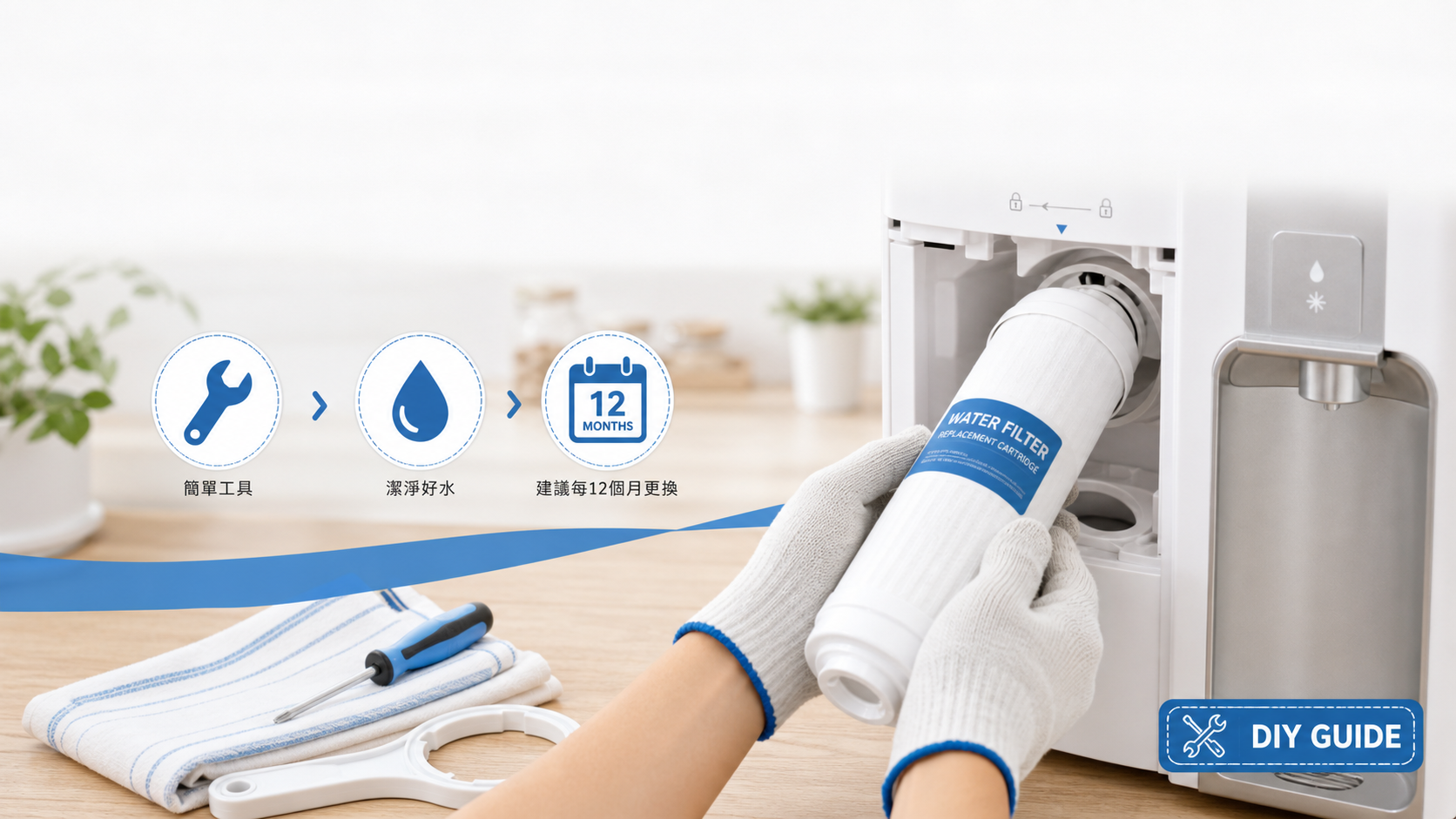
Philips RO Water Filter Replacement + Maintenance Complete Guide 2026: 7 Steps to Help You Replace It Yourself
Filter replacementMaintenance GuidePhilips ADD550DIY
Key points:Philips RO water machineThe ADD550 5-in-1 AquaShield filter has a 12-month lifespan.(Applicable to ADD6910, ADD6911L, ADD6915, ADD6922). The entire replacement process only requires...10 minutesNo need for a technician. With weekly cleaning and maintenance, the water machine can serve for 5-10 years. This article teaches you 7 steps to replace the filter yourself + a complete maintenance schedule.
📌 Remember in one minute
- 🔄 Filter replacement cycle:12 months (approximately 1,000-1,500 liters of usage)
- 💵 Original ADD550 filter cartridge price:HK$598-798
- 🧰 Replacement time:Within 10 minutes, no tools required
- 🚿 Must be done after replacement:Rinse with the first 2 liters of water before drinking.
- 🧽 Routine maintenance:Clean the raw water tank weekly; wipe the water outlet monthly; perform deep descaling every 6 months.
- ⚠️ Never:Use bleach, strong acid, or non-original filter cartridges.
Part 1: 7 Steps to Change Your ADD550 Filter Cartridge
Power off and unplug
Turn off the water dispenser power and completely unplug the power cord from the socket. Safety first, and also to avoid accidentally pressing the water dispensing button during the replacement process.
Empty both water tanks
Dump all the water in the raw water tank (tap water inlet) and the clean water tank (filtered water). Can be picked up with different cups to avoid leakage.
Open the filter compartment door
The location of the filter cartridge varies by model — ADD6910 / ADD6911L is at the bottom of the unit, while ADD6922 is on the side. Just push or pull gently to open.
Remove the old filter element
Rotate the old ADD550 filter counterclockwise90 degreesThen pull it out directly. There may be a small amount of residual water; remember to catch it with a towel.
Install new filter element
Unpack the new ADD550 filter cartridge, align it with the groove inside the filter cartridge compartment, and rotate clockwise.90 degreesUntil it locks. You will hear a "click" sound.
Reset filter indicator light
Plug in the power and turn it on; press and hold the button on the device.Filter reset button(Usually marked ⚙️ or Reset) Approximately5 secondsThe indicator light will flash and then turn off, indicating that the system has been reset to a 12-month timer.
Rinse with the first 2 liters of water
Refill the raw water tank and turn on the power.Each water outlet(Hot water, room temperature water, cold water) are dispensed.2 liters of water, and then pour it out. This step washes away the activated carbon powder from the new filter cartridge to ensure clear water quality.
⚠️ Important Safety Tips
Remember to usePhilips Genuine ADD550 Filter CartridgeThere are aftermarket filters on the market that claim compatibility, but actual tests show poor RO performance, which may cause blockage or leakage, leading to damage to the unit and loss of warranty. Original filters can be purchased from authorized channels such as Digibal Online, Fortress, and HKTVmall.
🔄 Order the original ADD550 filter now!
Genuine product from the original manufacturer · 12-month lifespan · Compatible with ADD6910 / ADD6911L / ADD6915
Select ADD550 filter cartridge → Browse Philips water purifiers →Part Two: Philips Water Purifier Complete Maintenance Schedule
| frequency | Maintenance items | time | Required supplies |
|---|---|---|---|
| daily | Check the water level in the tank and ensure smooth water flow. | 1 minute | — |
| weekly | Remove the raw water tank, rinse it with clean water, and wipe the outer shell with a towel. | 5 minutes | Water + Soft cloth |
| per month | Clean the sprue with diluted citric acid or food-grade white vinegar. | 10 minutes | Citric acid / white vinegar |
| Every 3 months | Check the filter life indicator light. | 1 minute | — |
| Every 6 months | Deep descaling (internal heating element) | 30 minutes | Philips Descaling Agent |
| Every 12 months | Replace ADD550 filter cartridge | 10 minutes | New ADD550 filter cartridge |
Part Three: Monthly Deep Cleaning in 4 Steps
① Clean the raw water tank
Remove the raw water tank and rinse it thoroughly with clean water and a few drops of dish soap, paying special attention to the lid area where bacteria can easily accumulate. Let it air dry completely after rinsing.
② Clean the water tank
The water purification tank is usually not removable, usingDiluted food-grade citric acid solution(1 teaspoon + 1 liter of water) pour in, let sit for 30 minutes and then drain. Rinse with clean water 2 times, then release 2 liters of water to wash away the residue.
③ Clean the water outlet
Wipe the inside and outside of the water outlet with a cotton swab dipped in white vinegar or citric acid. Water outlets are prone to accumulating limescale and bacteria, so this step is very important.
④ Clean the outer casing of the machine.
Wipe the outer casing with a slightly damp soft cloth to prevent water from seeping into the buttons.Do not use alcohol or bleach.To avoid damaging the plastic surface and screen printing.
Part Four: Troubleshooting Common Faults
| question | Possible reasons | Solution |
|---|---|---|
| The water flow narrows | Filter cartridge clogged / nearing the end of its life | Check the filter cartridge life and replace it if necessary. (ADD550) |
| The water has an odor | Filter cartridge saturated / Bacteria growing in water tank | Replace filter cartridge + deep clean water tank |
| The water wasn't hot enough | Scale buildup on heating element / Unstable power supply | Deeply remove scale with descaling agent |
| The filter indicator light is flashing red. | It has been 12 months / High water consumption | Replace the ADD550 filter immediately. |
| White particles are present in the effluent. | New filter element activated carbon powder | Rinse with 2-3 liters of water. |
| Water leakage from the fuselage | Filter element not installed properly / O-ring aging | Reinstall the filter cartridge, or contact Philips customer service. |
Part 5: Maintenance Do's & Don'ts
✅ Must-do items
- Clean the raw water tank weekly.
- Use genuine ADD550 filter cartridge
- Replace the filter when the indicator light comes on.
- Deep descaling every 6 months
- Empty the water tank and unplug the power before an extended trip (more than 1 week).
- Rinse the first 2 liters of water after replacing the filter cartridge.
❌ Do not do the following:
- Cleaning with bleach or strong acids (will damage the plastic)
- Using aftermarket/counterfeit filters (loss of maintenance + poor RO efficiency)
- The machine body can be submerged in water or cleaned with a high-pressure water jet.
- Using expired filter cartridges may contaminate the water.
- Storing hot water in a hot water tank for a long time
- Place the machine near high-temperature equipment such as stoves and microwave ovens.
Frequently Asked Questions
💧 Maintain your Philips water dispenser
Genuine ADD550 filter cartridge · Free shipping · Authentic product
Order replacement filter now → Browse the full range of water purifiers →