


MOMAX Q.Mag X 5000mAh Magnetic Power Bank - Gen 2 IP116A [Hong Kong Official Stock]
Inventory: In stock (estimated to ship within one business day)
Delivery and shipping fees (Free shipping on orders over HK$500)
International Shipping
Free-shipping thresholds · Power Bank surcharge
Hong KongFREE
SF Locker: Free for all orders · Door-to-door: Free over HK$500
Macau
Free shipping on orders HK$800+ (2-3 business days)
Australia (6-12 business days depending on area or zone)
Free over AU$100 · Flat AU$9.99 below
United Kingdom 0-3kg (3 - 5 business days); 3kg+ (5 - 8 business days)
Free over £40 · Flat £6.99 below
Singapore (5 - 8 business days)
Free over S$40 · Flat S$9.99 below
European Union (6 - 10 business days)
Free over €49 · Flat €9.99 below
Malaysia (6 - 10 business days)
Free over RM40 · Flat RM9.99 below
🇦🇺Australia — Power Bank
| Weight | Fee |
|---|---|
| 0 – 0.51 kg | AU$ 24.39 |
| 0.51 – 1.01 kg | AU$ 36.99 |
| 1.01 – 1.51 kg | AU$ 55.99 |
🇬🇧United Kingdom — Power Bank
| Weight | Fee |
|---|---|
| 0 – 0.51 kg | £ 9.99 |
| 0.51 – 1.1 kg | £ 15.99 |
| 1.1 – 1.51 kg | £ 22.99 |
🇸🇬🇲🇾SG / Malaysia — Power Bank
| Weight | Fee |
|---|---|
| 0 – 0.51 kg | SGD 18.99 |
| 0.51 – 1.01 kg | SGD 23.99 |
| 1.01 – 1.51 kg | SGD 27.99 |
🇮🇪Ireland — Power Bank
| Weight | Fee |
|---|---|
| 0 – 0.51 kg | € 26 |
| 0.51 – 1 kg | € 39 |
| 1 – 1.51 kg | € 51.99 |
🇨🇦Canada — Power Bank
| Weight | Fee |
|---|---|
| 0 – 0.51 kg | CA$ 37.05 |
| 0.51 – 1.01 kg | CA$ 58.33 |
| 1.01 – 1.51 kg | CA$ 82.41 |
⚡ Express Shipping — free option available, refer to checkout.
📦 Heavy / Oversized items (e.g. water dispenser) — contact customer service for a custom freight quote.
Warranty
Maintenance Terms and Conditions / Warranty Information
DIGIBAL Official Warranty Coverage
This product is Authentic Hong Kong goods, enjoy Original factory one-year warranty (Unless otherwise specified on the product page). Customers must keep this information safe. Purchase receipts and products Hong Kong distributor of skin care stickers (It is recommended to take photos for record-keeping). If the product malfunctions during the warranty period, the customer must...Contact the Hong Kong general agent directly. Arrange for testing and repair.
🌏 Overseas (US / CA / UK / SG / AU)
All products are Hong Kong official versions supplied with a UK-style 3-pin plug. Travel adapters are not included. Warranty coverage ranges from 1 to 2 years, with all servicing performed in Hong Kong. Local return warehouses available in Australia, UK and USA.
Contact CSProvide photos/videos
Submit photos/videos
Local ReturnShipping costs are paid by the customer first.
Customer pays upfront
Ship to HK Maintenance arranged by the company
Warranty processed
Reimbursement Full refund upon presentation of receipt
Full refund of postage
Overseas customers may choose between the following two options:
For other countries, please contact customer service for a return address.
MOMAX Q.Mag X 5000mAh Magnetic Power Bank - Gen 2 IP116A [香港行貨]|MOMAX 香港行貨
Apple iOS devices (iPhone 12–16 series and compatible MagSafe accessories) Android devices
Product overview
The MOMAX Q.Mag X 5000mAh Magnetic Power Bank - Gen 2 IP116A [香港行貨] is a portable power bank product. Official specifications list: Compatibility: Apple iOS devices (iPhone 12–16 series and compatible MagSafe accessories) Android devices supporting wireless charging or USB-C Power Delivery Electronics compatible with wireless or USB-C charging; Battery capacity: 5000mAh (19.25Wh).
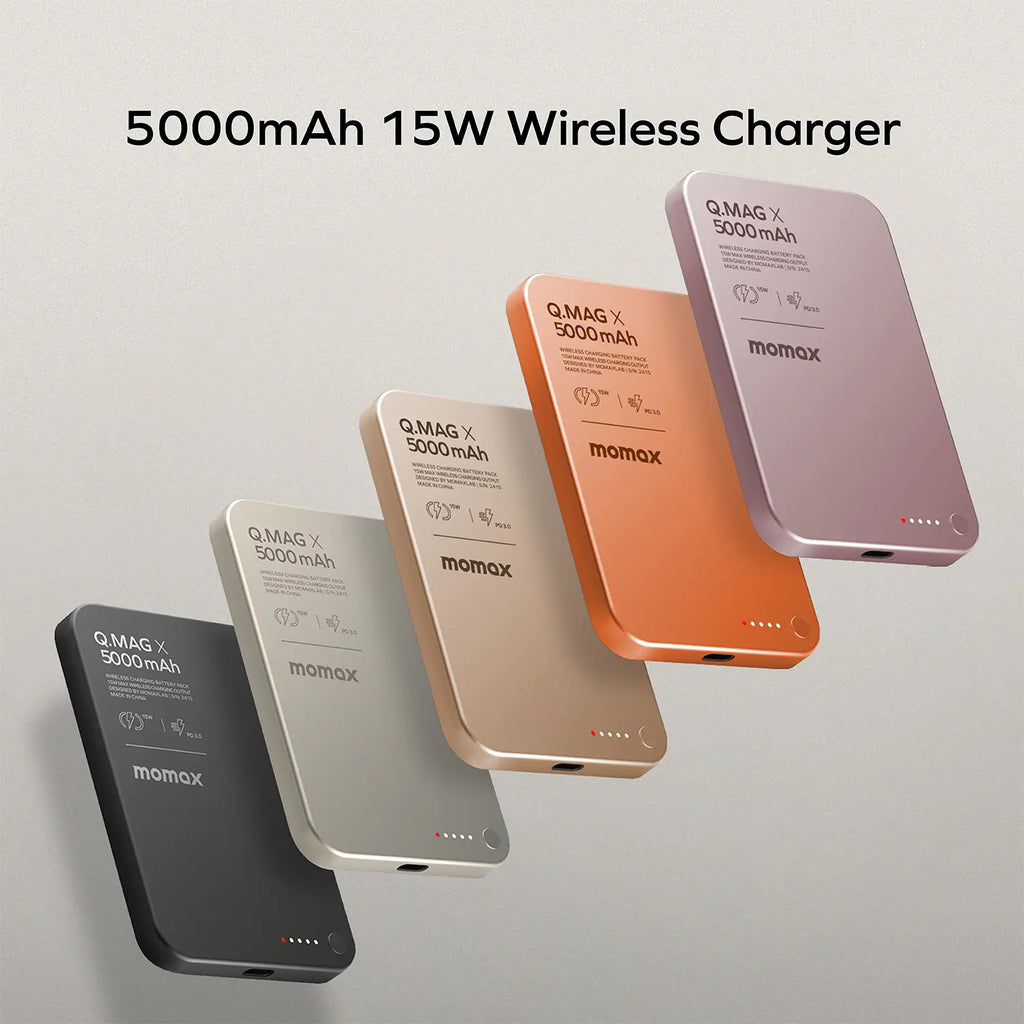
Compatible devices: Pink, Orange, Q.Mag X Gen 2 magnetic wireless power bank, 5000mAh (19.25Wh), with magnetic attachment, USB-C charging and up to 15W wireless output., 104 × 68.5 × 8.3mm; 125g. Select Black, Titanium, Sandstone, Pink or Orange., Decrease quantity.
When choosing a power bank, in addition to capacity, you should also consider how many devices can be charged simultaneously and whether it supports wired or wireless charging; magnetic attachment is convenient but less efficient, while wired PD charging is faster.
Six key highlights
Battery capacity
Capacity determines how many times a device can be charged; the stated figure refers to the cell capacity, while the actual output will be slightly lower due to conversion losses.
Impact on actual use: 5000mAh (19.25Wh)
- Compatibility:Apple iOS devices (iPhone 12–16 series and compatible MagSafe accessor
- Fast charging standards:PD3.0, PPS, QC3.0, SCP, FCP
USB-C input
The input specifications determine the recharge speed; a PD-compatible charger provides noticeably faster recharging.
Impact on actual use: 5V⎓3A, 9V⎓2A
- Compatibility:Apple iOS devices (iPhone 12–16 series and compatible MagSafe accessor
- Battery capacity:5000mAh (19.25Wh)
USB-C output
The output specifications determine which devices can be fast-charged; the protocols must be compatible for fast charging to be enabled.
Impact on actual use: PD20W (5V⎓2.4A, 9V⎓2.22A)
- Compatibility:Apple iOS devices (iPhone 12–16 series and compatible MagSafe accessor
- Battery capacity:5000mAh (19.25Wh)
Wireless output
The output specifications determine which devices can be fast-charged; the protocols must be compatible for fast charging to be enabled.
Impact on actual use: 5W, 7.5W, 10W, 15W (compatible iPhone devices up to 7.5W)
- Compatibility:Apple iOS devices (iPhone 12–16 series and compatible MagSafe accessor
- Battery capacity:5000mAh (19.25Wh)
Dimensions
The dimensions affect portability and storage; pay attention to the length and width when travelling or carrying it in a bag.
Impact on actual use: 104 × 68.5 × 8.3mm
- Compatibility:Apple iOS devices (iPhone 12–16 series and compatible MagSafe accessor
- Battery capacity:5000mAh (19.25Wh)
Weight
Weight affects portability; the difference between carrying it in a bag and holding it in your hand is noticeable.
Impact on actual use: 125g
- Compatibility:Apple iOS devices (iPhone 12–16 series and compatible MagSafe accessor
- Battery capacity:5000mAh (19.25Wh)
What's Included
The following is the packaging content for Hong Kong official stock. Actual accessories may vary by shipment batch; if you have any questions, please contact us for confirmation before placing your order.
- Packaging contents may vary by shipment batch. If you need to confirm any specific accessories, please contact us before placing your order.
- Hong Kong official stock; warranty coverage is subject to this product page and the distributor's terms.
Suitable Scenarios
MOMAX Q.Mag X 5000mAh Magnetic Power Bank - Gen 2 IP116A [Hong Kong official stock] is suitable for the following situations:
- Pink
- Orange
- Q.Mag X Gen 2 magnetic wireless power bank, 5000mAh (19.25Wh), with magnetic attachment, USB-C charging and up to 15W wireless output.
- 104 × 68.5 × 8.3mm; 125g. Select Black, Titanium, Sandstone, Pink or Orange.
Why Choose This Model
- Compatibility:Apple iOS devices (iPhone 12–16 series and c
- Battery capacity:5000mAh (19.25Wh)
- Fast charging standards:PD3.0, PPS, QC3.0, SCP, FCP
- USB-C input:5V⎓3A, 9V⎓2A
- USB-C output:PD20W (5V⎓2.4A, 9V⎓2.22A)
- Wireless output:5W, 7.5W, 10W, 15W (compatible iPhone device
Full Specifications
Same-Series Comparison
The table below shows the actual specifications of this model, allowing you to compare them with the requirements of your device when making a purchase.
| Item | MOMAX Q.Mag X 5000mA |
| Compatibility | Apple iOS devices (iPhone 12–16 series |
| Battery capacity | 5000mAh (19.25Wh) |
| Fast charging standards | PD3.0, PPS, QC3.0, SCP, FCP |
| USB-C input | 5V⎓3A, 9V⎓2A |
| USB-C output | PD20W (5V⎓2.4A, 9V⎓2.22A) |
| Wireless output | 5W, 7.5W, 10W, 15W (compatible iPhone |
| Dimensions | 104 × 68.5 × 8.3mm |
| Weight | 125g |
Frequently Asked Questions
Q: Before buying, how can I tell whether my phone case supports magnetic attachment?
A: Check the case first: it needs to be a MagSafe magnetic case or have a magnetic ring on the back to snap on and hold firmly. Plain leather or hard cases without a magnetic ring only provide a weak grip through the case, so the power bank can easily slide off. Consider what type of case you are using before buying.
Q: My case has no magnetic ring. Can I still charge?
A: Yes. Connect the power bank to your phone with a USB-C cable and it will charge as normal (some models also include a built-in short USB-C cable; refer to the package contents). Magnetic attachment is just a convenient snap-on charging option, not the only way to charge.
Q: To get a stronger hold, should I add a magnetic ring or change the case?
A: Either option works: adding a magnetic ring is the quickest and most affordable fix—centre it over the phone's charging coil; switching to a MagSafe magnetic case is the most secure option, as it locks directly onto the phone. Consider whether you want to keep your current case before buying.
Q: Why does the power bank slide off so easily after I attach it?
A: In most cases, the phone case has no magnetic ring—the connection is already loose when attached, so it can slide off when bumped or placed in a bag. This is a physical limitation, not a fault; adding a magnetic ring or switching to a magnetic case will solve the problem.
Q: Before buying, how do I know if my phone case works with magnetic charging?
A: Check your case first: a MagSafe case, or one with a magnet ring on the back, snaps on and locks firmly. Plain leather or hard cases without a ring let the magnets grip only weakly through the shell, so the pack slides off easily. Consider your case before buying.
Q: My case has no magnet ring - can I still charge?
A: Yes. Connect the power bank and your phone with a USB-C cable (some models include a built-in short USB-C cable - see the package list); magnetic attachment is just the snap-on convenience, not the only way to charge.
Q: To get a stronger hold, should I add a ring or change the case?
A: Both work: a magnetic ring is the quickest fix - centre it on the back of your phone; a MagSafe case is the most secure, locking directly onto the phone. Consider whether you want to keep your current case.
Q: Why does the power bank slide off so easily?
A: Most likely your case has no magnet ring - the connection sits loose from the moment it attaches and slides off at a touch or in a bag. That is physics, not a fault; a ring or a MagSafe case solves it.
Q: Why won't my new device charge after unboxing, or why is there no response when I press the button repeatedly?
A: New units generally contain some reserve power when shipped, but long-distance transport may activate transport protection mode. First, press and hold the power button for about 5 seconds to wake it. If there is still no response, charge the power bank itself with a qualified charger for 10–15 minutes to unlock it. Once the LED lights up, use it to charge your device.
Q: Why does charging earbuds, a smartwatch, or another small device stop automatically after a short time?
A: The power bank automatically switches off to save power when it does not detect sufficient current. Double-press the power button to enable trickle (low-current) mode before charging earbuds or a smartwatch. Double-press again after charging to return to normal mode.
Q: Why does charging stop temporarily, or why does the power bank feel slightly warm?
A: This is usually caused by overheat protection. Hot weather, direct sunlight, or using the device while charging can trigger it. Move the power bank to a cool, shaded place and let it cool down before using it again. The issue may also be caused by poor cable contact, so try another qualified cable. Overheat protection is a safety feature, not a fault.
Q: Why does charging my phone stop at 80%?
A: This is caused by your phone's battery protection feature (Optimized Charging), not a problem with the power bank. Depending on your usage habits, the phone may pause charging at 80%. Pick up and use the phone, or turn off Optimized Charging, to resume charging.
Q: Why is there no response when I place my phone on the magnetic/wireless charging area?
A: After placing it on your phone, wait 2–3 seconds for the devices to communicate before charging starts. Then align it with the centre of the phone's charging coil. A case that is too thick or made with metal may block the signal, so remove the case for the most accurate test.
Q: Why is the power bank charging itself very slowly or not reaching full charge?
A: Use a charger with sufficient wattage and a certified cable (e.g. 20W or above PD) for faster charging. Also make sure you are using the port marked as input, as some ports are output only.
Q: The brand-new unit will not charge anything / the button does nothing?
A: New units ship with reserve charge but may enter shipping-protection mode after long transit: press and hold the power button for about 5 seconds to wake it; if still unresponsive, charge the power bank itself with a proper charger for 10-15 minutes to unlock - once the LED lights up, charge your device.
Q: Charging earbuds or a watch stops after a moment?
A: The bank auto-shuts when it detects a tiny current. Double-press the power button to switch to trickle (low-current) mode for earbuds and watches, then double-press back to normal mode afterwards.
Q: Charging starts and stops, or the body gets a little warm?
A: Usually the over-heat protection: hot weather, direct sun, or charging while using the device can trigger it - move to a cool spot and let it cool; it can also be a loose cable, try a certified cable. Over-heat protection is a safety feature, not a fault.
Q: Why does my phone stop at 80% when charging from the bank?
A: That is the phone's own battery optimisation, not the power bank - the phone pauses at 80% based on usage habits; take it off charge to continue, or turn off optimised charging.
Q: The magnetic / wireless pad shows no response with my phone on it?
A: Wait 2-3 seconds after placing the phone - sensing takes a moment; centre it on the charging coil; a very thick or metal case blocks sensing - test without the case.
Q: The power bank itself charges slowly or never reaches full?
A: Use a sufficiently powerful charger and a certified cable (e.g. 20W+ PD); also check you are using the port marked as input - some ports are output only.
MOMAX Q.Mag X 5000mAh Magnetic Power Bank - Gen 2 IP116A [Official Hong Kong Version]: Choose according to your device
Tell us which devices you will charge and how many you will use at the same time, and we’ll help confirm whether this model is sufficient.
MOMAX|Local Support

