
How much does it cost to get started with SwitchBot whole-home smart living? 3 real-price plans for Hong Kong in 2026 (HK$1,328 / HK$3,758 / HK$4,810)
The short answer:For a 400 sq ft Hong Kong apartment, the basic whole-home smart setup for “lights + curtains + door lock + sensors”around HK$3,758is enough; a starter setup for just one room (lights + curtains) costs around HK$1,328; adding air-conditioning, a doorbell and temperature-and-humidity automation brings the total to HK$4,810. The key is not how many devices you buy, butwhether you have a Hub as the central hub — without a Hub, most automations cannot be set up.
Overview of the three budget plans
The price covers one-time hardware costs and excludes installation. The curtain robot and door lock can be self-installed without a technician.
Three packagesNot cumulative:They are three independent purchase options assembled based on currently available stock, each addressing a different need (control layer/access control/automation). The original design targets were $1,500/$4,000/$8,000, but based on the available model combinations, the actual totals are HK$1,328/HK$3,758/HK$4,810 respectively, with the difference available for future add-ons.
| 1 HK$ = | S$ SGD | A$ AUD | £ GBP | US$ USD |
|---|---|---|---|---|
| Reference exchange rates | S$0.16332 | A$0.18128 | £0.09565 | US$0.12748 |
Small-shop version: turning a three-tier home budget into a three-item shop setup
With the same budget, a home setup buys “convenience”, while a shop setup buys “evidence”.The three tiers in the shop version are not about adding more sensors, but about a different order of priorities: entrance first, checkout counter next, and automation last.
See the itemized price breakdown for the complete version inHow much does shop CCTV cost (actual 8-channel calculation)The price ranges shown in the three tiers above are estimates based on real-time API pricing; please refer to the product page for the actual prices.
What’s the difference between Hub 3 / Hub 2 / Hub Mini? (Most frequently asked)
Answer:Hub 3 is the only model that supports both Matter and temperature and humidity sensing; Hub 2 has temperature and humidity sensing, but Matter support depends on the firmware version; Hub Mini is simply an infrared transmitter + Bluetooth gateway, with no sensors.
If you’re only buying one Hub, go straight for Hub 3 in 2026: the price difference is relatively small, but without it, you’ll need to buy a new one later if you want to connect Matter devices.
What should Hong Kong users pay special attention to?
Three points:Plug(SwitchBot products are mostly USB-powered or come with UK-style three-pin plugs; our store sells the Hong Kong version),Voltage(220V is supported, but for infrared control of your air conditioner, make sure your air conditioner model is included in the App’s infrared code database),Warranty(Only the Hong Kong version comes with local warranty service; parallel imports must be sent back for repair at your own expense).
Also, older buildings in Hong Kong commonly have light switches with no neutral wire. In this case, avoid smart switches that require a neutral wire, and opt for smart bulbs or curtain robots instead for greater reliability.
Can smart locks be installed in rental properties?
Answer: Yes. Choose a model that requires no drilling or can be restored to the original setup. When moving out, simply replace the original lock cylinder. Pay attention to the door thickness and latch type (support varies for the cross locks and crescent locks commonly found in Hong Kong). Measure the door thickness and take a photo of the latch before purchasing.
Another practical consideration: some building management offices require the exterior appearance of the entrance door to remain unchanged, so check with the management office before installation.
How can I set up automations without making them annoying?
The most common mistake beginners make is setting up too many automations and eventually turning them all off. We recommend starting with just three:①Turn off the lights and air conditioner when leaving home ②Turn on the lights when arriving home ③Close the curtains before bed. Run these for two weeks until they are stable before adding a fourth.
Do not place sensors near an air conditioner vent or by a window, as the temperature readings may be inaccurate, causing temperature-control automations to trigger incorrectly.
Frequently Asked Questions
🏠 Actual products for the three budget plans (verified on 2026-11-06)
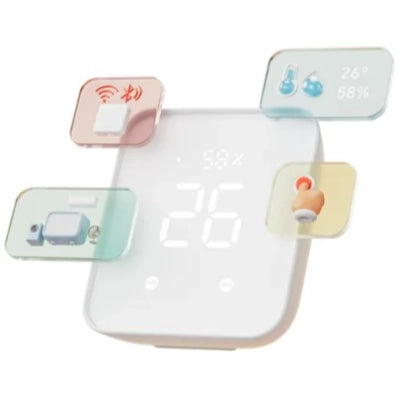
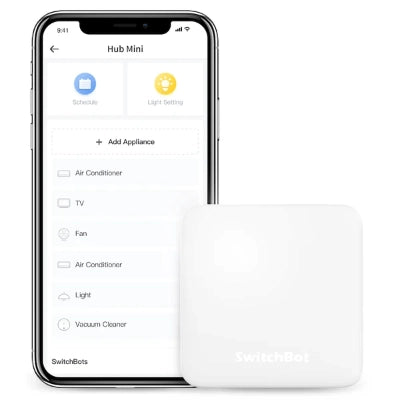
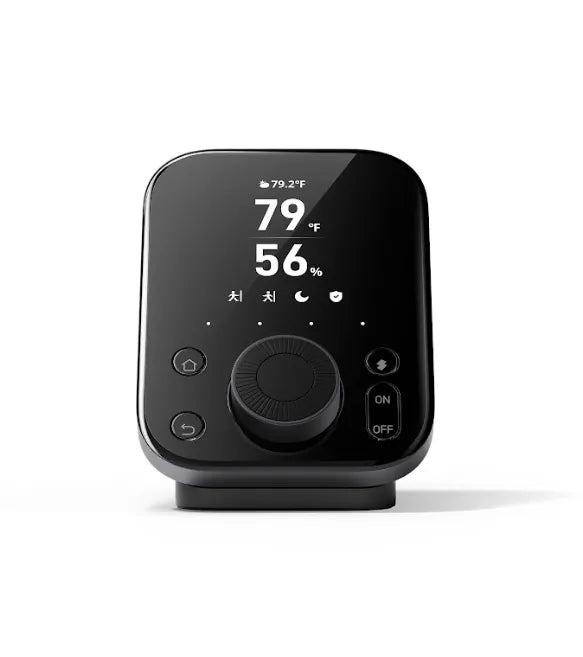
Prices are generated by the SHOPLINE product API. Verified on 2026-11-06; please refer to the product page for the latest information.
Does SwitchBot require a subscription?
No. Basic functions and automations are free; only selected services, such as cloud recording for cameras, incur charges.
Can it be controlled with Google Home / Apple Home?
Yes. It can be connected via the Matter support on Hub 3. Hub Mini does not support this and can only be controlled through the SwitchBot App or limited Google Home integration.
Will automations stop working after a power outage?
Yes. After power is restored, the Hub and devices need to reconnect. They generally resume automatically within 1–2 minutes.
Can the Curtain Bot grip firmly?
It works with Roman blinds and most track curtains, but is not suitable for venetian blinds or vertical blinds. The track diameter must fall within the 【Fill in: specifications】 range.
Can it control split-type air conditioners?
Yes. It uses infrared signals through the Hub for control. However, first confirm that the air conditioner model has a corresponding infrared code. Some functions of inverter air conditioners, such as fan speed, may not be fully replicated.
Ready-to-buy list (official website prices as of 2026-11-06; all in stock and Hong Kong authorized stock):
Option 1|Entry-level|Actual total HK$1,328
- SwitchBot Hub 2 Smart Hub [Hong Kong authorized stock] — HK$530
- SWITCHBOT Bot Smart Switch Button White [Hong Kong authorized stock] — HK$199
- SwitchBot RGBICWW Floor Lamp Ambient Floor Light - Hong Kong authorized stock — HK$599
Option 2|Access control and doorbell|Actual total HK$3,758
- SwitchBot Smart Lock Ultra Super Smart Door Lock [Hong Kong authorized stock] — HK$1,280
- SwitchBot Keypad Vision Pro Vision Pro Unlocker - Palm Print/Face/Fingerprint/Passcode】 [Hong Kong authorized stock] — HK$920
- SwitchBot Smart Video Doorbell [One-year Hong Kong authorized warranty] — HK$1,028
- SwitchBot Hub 2 Smart Hub [Hong Kong authorized stock] — HK$530
Option 3|Curtain and cleaning automation|Actual total HK$4,810
- SwitchBot AI Hub Smart Home Integration [Hong Kong authorized stock] — HK$1,780
- SWITCHBOT K11+ Smart Robot Vacuum [Hong Kong authorized stock] — HK$2,480
- SWITCHBOT Curtain 3 Smart Curtain Robot for U-shaped Tracks M2K-SBCU3-U [Hong Kong authorized stock] — HK$550
You can purchase the complete setup, or start with just the first step (Hub 2 + Bot) to try out the automation and add devices one by one later.
Sources and Methodology
Specifications: SwitchBot official product pages (accessed in 2026-10). Prices: Our store's product pages. Installation conditions: On-site installation experience in Hong Kong units measuring 300–600 sq ft (curtain tracks, door lock types, and Wi-Fi placement). Limitations: Automation stability may be affected by router performance and 2.4GHz interference, and conditions can vary significantly between individual housing estates.
Related articles:Complete Comparison of Hub 2 vs Hub 3、Choosing a Lock Ultra + Hub Combination、EZVIZ Camera Buying Guide