



Reolink Home Hub 2 Smart Home Security Hub [Hong Kong Official Stock]
Inventory: In stock (estimated to ship within one business day)
Delivery and shipping fees (Free shipping on orders over HK$500)
International Shipping
Free-shipping thresholds · Power Bank surcharge
Hong KongFREE
SF Locker: Free for all orders · Door-to-door: Free over HK$500
Macau
Free shipping on orders HK$800+ (2-3 business days)
Australia (6-12 business days depending on area or zone)
Free over AU$100 · Flat AU$9.99 below
United Kingdom 0-3kg (3 - 5 business days); 3kg+ (5 - 8 business days)
Free over £40 · Flat £6.99 below
Singapore (5 - 8 business days)
Free over S$40 · Flat S$9.99 below
European Union (6 - 10 business days)
Free over €49 · Flat €9.99 below
Malaysia (6 - 10 business days)
Free over RM40 · Flat RM9.99 below
🇦🇺Australia — Power Bank
| Weight | Fee |
|---|---|
| 0 – 0.51 kg | AU$ 24.39 |
| 0.51 – 1.01 kg | AU$ 36.99 |
| 1.01 – 1.51 kg | AU$ 55.99 |
🇬🇧United Kingdom — Power Bank
| Weight | Fee |
|---|---|
| 0 – 0.51 kg | £ 9.99 |
| 0.51 – 1.1 kg | £ 15.99 |
| 1.1 – 1.51 kg | £ 22.99 |
🇸🇬🇲🇾SG / Malaysia — Power Bank
| Weight | Fee |
|---|---|
| 0 – 0.51 kg | SGD 18.99 |
| 0.51 – 1.01 kg | SGD 23.99 |
| 1.01 – 1.51 kg | SGD 27.99 |
🇮🇪Ireland — Power Bank
| Weight | Fee |
|---|---|
| 0 – 0.51 kg | € 26 |
| 0.51 – 1 kg | € 39 |
| 1 – 1.51 kg | € 51.99 |
🇨🇦Canada — Power Bank
| Weight | Fee |
|---|---|
| 0 – 0.51 kg | CA$ 37.05 |
| 0.51 – 1.01 kg | CA$ 58.33 |
| 1.01 – 1.51 kg | CA$ 82.41 |
⚡ Express Shipping — free option available, refer to checkout.
📦 Heavy / Oversized items (e.g. water dispenser) — contact customer service for a custom freight quote.
Warranty
Maintenance Terms and Conditions / Warranty Information
DIGIBAL Official Warranty Coverage
This product is Authentic Hong Kong goods, enjoy Original factory one-year warranty (Unless otherwise specified on the product page). Customers must keep this information safe. Purchase receipts and products Hong Kong distributor of skin care stickers (It is recommended to take photos for record-keeping). If the product malfunctions during the warranty period, the customer must...Contact the Hong Kong general agent directly. Arrange for testing and repair.
🌏 Overseas (US / CA / UK / SG / AU)
All products are Hong Kong official versions supplied with a UK-style 3-pin plug. Travel adapters are not included. Warranty coverage ranges from 1 to 2 years, with all servicing performed in Hong Kong. Local return warehouses available in Australia, UK and USA.
Contact CSProvide photos/videos
Submit photos/videos
Local ReturnShipping costs are paid by the customer first.
Customer pays upfront
Ship to HK Maintenance arranged by the company
Warranty processed
Reimbursement Full refund upon presentation of receipt
Full refund of postage
Overseas customers may choose between the following two options:
For other countries, please contact customer service for a return address.
REOLINK · DIGIBAL ONLINE
Reolink Home Hub 2
Smart Home Security Hub
Connect up to 8 Reolink cameras to a single hub: keep recordings stored locally, find footage with keywords, and support up to 16TB of storage—all with no monthly fees and no cloud required.

Product Overview
Home Hub 2 is the second-generation hub in the Reolink Home Hub series. It brings Wi-Fi and PoE cameras together, saves recordings to a local hard drive or microSD card, and introduces AI Video Searchon the Hub for the first time—simply enter keywords such as “delivery person” or “car” to jump directly to relevant clips among hundreds of hours of recordings, without dragging through the timeline frame by frame.
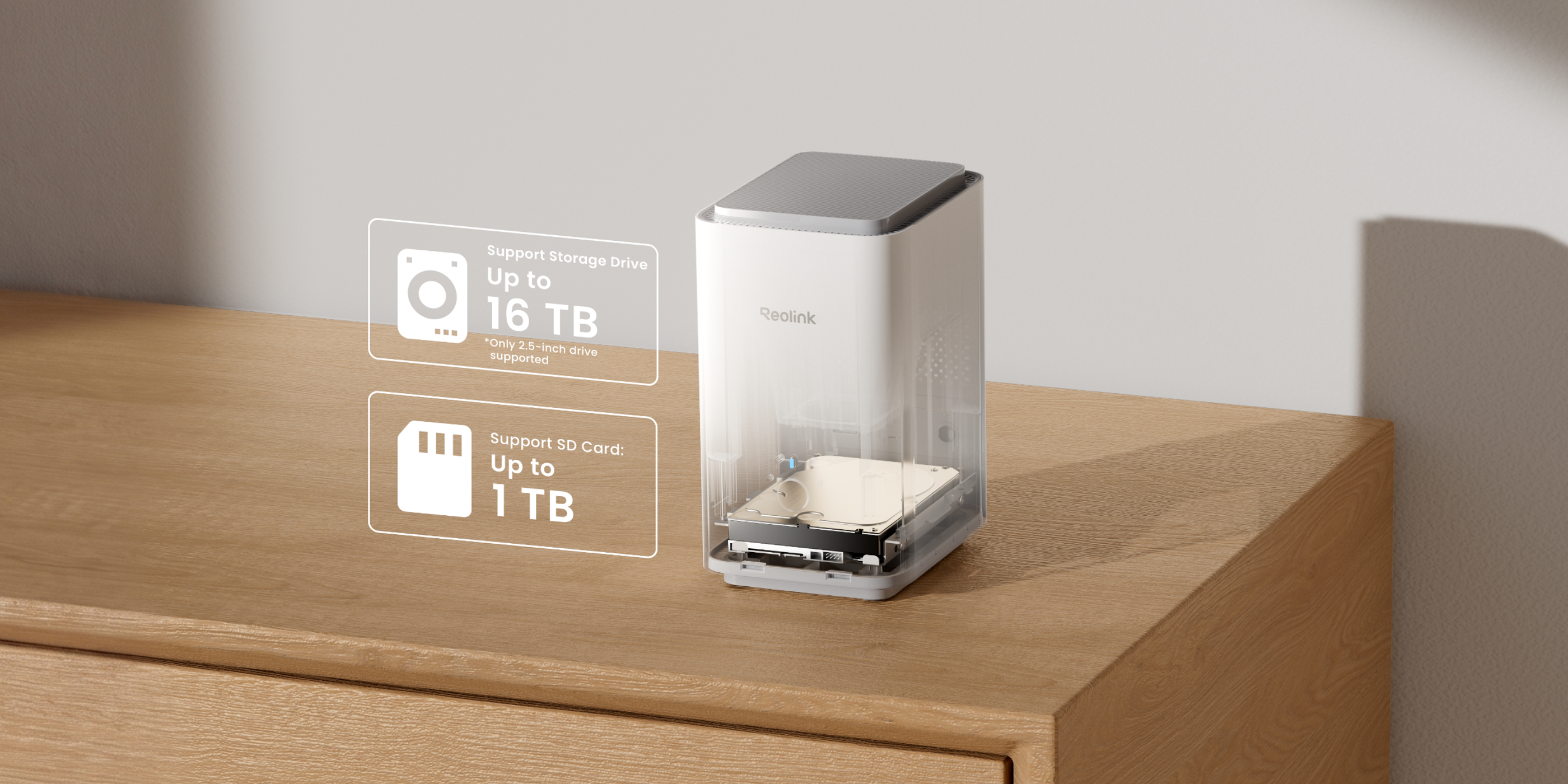
The biggest difference from the first-generation Home Hub (microSD capacity limited to 2TB) is that Home Hub 2 adds a 2.5-inch SATA hard drive/SSD bay with support for up to 16TB. It can also accommodate an additional 1TB microSD card. The supported number of users has increased from 11 to 20, while the device has grown from 95×95×161.8mm to 123×96×168mm.
Four limitations to note:
- Hard drive sold separately: Officially supports only 2.5-inch SATA hard drives or SSDs; no hard drive is included.
- Unsupported cameras: 4G cameras, cameras included in NVR kits, and add-on cameras. 2MP battery-powered cameras require a firmware upgrade first.
- No HDMI and no USB: Both are listed as unsupported in the official specifications.
- Wired connection is limited to 100M: The RJ45 port is a 10/100M WAN port, not Gigabit.
If you need HDMI output, USB backup, or a built-in hard drive, those features are available on Home Hub Pro. Home Hub 2 is the “choose-your-own-hard-drive” version and does not include a hard drive.
Six Key Features
AI Video Search
Enter a keyword to jump straight to relevant recorded clips—no need to manually drag along the timeline.
Up to 16TB of Local Storage
One 2.5-inch SATA hard drive/SSD bay, plus one 1TB microSD card.
8 Cameras・16MP
Connect up to 8 Reolink cameras, with streaming support up to 16MP.
AES-128 Encryption
Hard drive and memory card contents are encrypted, so the data cannot be read even if the device is taken.
Dual-Band Wi-Fi 6
802.11 ax, simultaneous 2.4GHz and 5GHz connectivity, with WPA3 support.
20 Users
1 administrator plus 19 shared accounts, allowing family members to view their assigned cameras separately.
AI Video Search: Find Footage by Keyword Without Dragging the Timeline
Traditional playback means selecting a date, choosing a camera, and dragging along the timeline. Finding a 5-minute clip may require dragging back and forth more than a dozen times. Home Hub 2 puts AI recognition directly on the hub: enter a keyword such as “Delivery guy” in the Reolink App, and the system lists thumbnails of all relevant events for you to open directly.

How It Works
- Cross-camera search: Scan all connected cameras with a single keyword instead of checking them one by one.
- Event-based results: Results are displayed as event thumbnails, making them ideal for reviewing incidents after the fact.
- What you save is time: Replace searching through hundreds of minutes of footage with a single scan of the thumbnails.
The official page also notes that AI Search requires the Reolink App and camera firmware to be updated to the latest versions. Older firmware may not display the search option.
16TB of Local Storage: Keep Recordings Private and Skip Monthly Fees
Home Hub 2 features one 2.5-inch SATA bay officially supporting up to 16TB, plus one microSD card slot supporting up to 1TB. All recordings are saved locally—nothing is uploaded to the cloud, and no subscription is required.
Official Specifications, Item by Item
One Hub to Centrally Manage 8 Cameras
Officially supports up to 8 cameras with a maximum resolution of 16MP. It is compatible with the full range of Reolink Wi-Fi and PoE cameras. Most battery-powered cameras are supported, but 2MP battery-powered cameras must be updated to the latest firmware first.
- Compatible: All Reolink Wi-Fi/PoE cameras (battery-powered cameras require a firmware update).
- Not compatible: 4G cameras, cameras included in NVR kits, and add-on cameras.
- Same-network connection: Battery-powered, PoE, and plug-in Wi-Fi cameras connected to the same router can all be added.
- Number of users: 20 (1 administrator plus 19 shared accounts), nearly twice as many as the 11 supported by the first generation.
- Accounts and sharing: Access and sharing options for individual devices are only available on Home Hub 2.
If your home already has a combination of Reolink cameras and the mobile App, Home Hub 2 brings everything together: view all cameras in the same App, store all recordings on the same hard drive, and share access with family members using the same set of accounts.
Encryption, offline operation, 115dB alarm: Your data stays at home
The official privacy design is described in specific terms: Recordings are stored with AES-128 encryption, so even if the hard drive or microSD is removed, the content cannot be read directly; local recording continues when the network is disconnected; Home Hub 2 also creates a local LAN, allowing devices on the same network to connect directly for viewing.
- AES-128 storage encryption: Protects against the “device being taken away.”
- Offline recording: Recording continues even when the network is down, without interruption caused by being unable to connect to the cloud.
- Local LAN access: View footage on the local network without going through the internet.
- Built-in speaker: Officially rated at up to 115dB and can be used as an alarm.
- Cross-device custom alerts: When a connected camera detects motion, the hub sends a notification.
Wi-Fi 6 dual-band and wired networking
Home Hub 2 connects to the router via a wired connection (a 1-meter network cable is included), then communicates with cameras via Wi-Fi 6. The official specifications list simultaneous dual-band 2.4/5GHz operation, with WPA, WPA2, and WPA3 wireless security support.
| Wireless standard | IEEE 802.11 a/b/g/n/ac/ax(Wi-Fi 6) |
| Operating frequency | 2.4GHz/5GHz |
| Wireless encryption | WPA/WPA2/WPA3 |
| Wired networking | 1 × 10/100M RJ45 WAN port |
| Network protocols | TCP/IP、UDP、DHCP、P2P、UPNP、RTSP、RTMP、SMTP、SSL/TLS、DNS、DDNS、NTP、FTP |
| Supported systems | Windows、Mac OS、iOS、Android |
| Smart home | Google Assistant、Alexa |
The 100M wired port is a meaningful limitation for “simultaneously reviewing 8 16MP cameras”: It is generally sufficient for live previews, but if you plan to continuously synchronize footage to a NAS or perform extensive remote playback, this figure should be factored into your planning.
Body, ports, and indicator lights
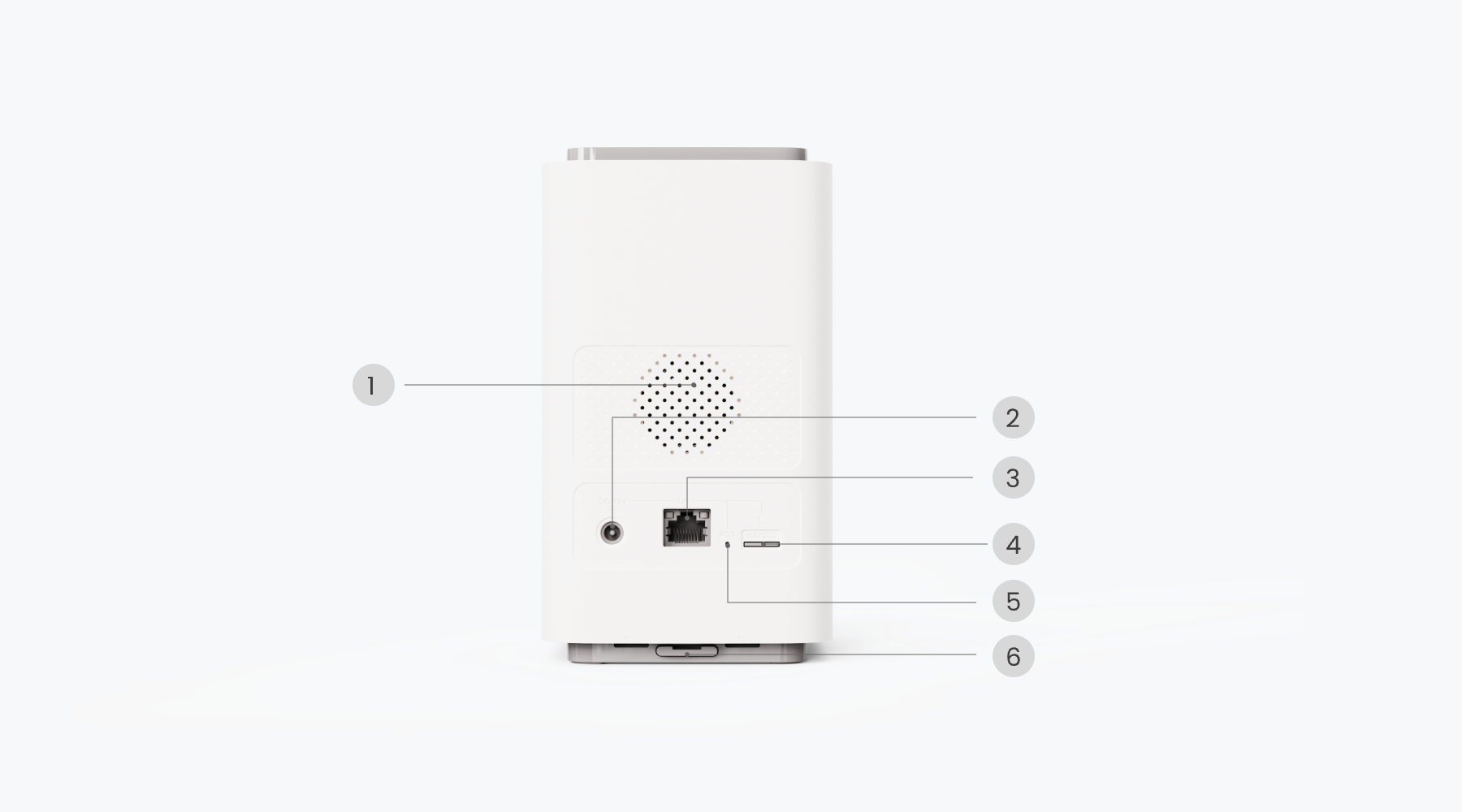
The device measures 123×96×168mm and weighs 518g, with a vertical design. From left to right on the back are the power input, network port, reset hole, and microSD card slot. The large honeycomb panel in the center houses the speaker and ventilation openings.


Six officially labeled components
| Speaker | Located at the center of the rear panel, up to 115dB |
| Power input | DC 12V/2A |
| Network | RJ45 10/100M WAN port |
| Reset | Reset hole on the back of the device; use with the reset pin included in the package |
| microSD card slot | Up to 1TB |
| Indicator light and button | On the front of the device, with a status light and physical button |
Two Easily Misunderstood Details
1. Only Supports 2.5-inch Hard Drives, and No Hard Drive Is Included
The official wording is “Supports up to 16TB, 2.5-inch hard drives only.” A 3.5-inch desktop hard drive will not fit. You will need to purchase a 2.5-inch hard drive or SSD separately. The package only includes the main unit, Ethernet cable, power supply, user manual, and reset pin—no hard drive or memory card is included. Please factor in the cost of the hard drive before placing your order.
2. No HDMI or USB
Many customers assume that all Hubs can be connected directly to a TV. In the official specification table, both HDMI and USB are listed as unsupported, and backup media is also not supported. To view footage, use the Reolink App or computer client. For HDMI output and USB backups, you need the Home Hub Pro.
Three Practical Use Cases
Village house or three-story village home: 4 outdoor cameras plus 2 indoor cameras
Connect four outdoor PoE cameras at the front door, parking area, back door, and rooftop, along with two indoor Wi-Fi cameras in the living room and hallway. All recordings are stored centrally on the same 2.5-inch hard drive. At night, if you want to check whether anyone entered the parking area last night, simply use AI Search and enter a keyword—there is no need to review the recordings from each camera individually.
Village convenience store or small warehouse: No desire to pay a monthly cloud fee
Cloud recording is billed monthly per camera, and the cost quickly becomes a fixed expense as the number of cameras increases. Home Hub 2 requires a one-time hardware purchase plus a separately purchased hard drive, with recordings stored on-site. The 20-user capacity is sufficient for the owner, store manager, and part-time staff.
Frequent renters or movers: No desire to drill holes or run cables
Pair battery-powered cameras with Home Hub 2. The main unit only needs power and an Ethernet connection, while the cameras do not require wiring. When moving, simply take the entire setup with you. Note that 2MP battery-powered cameras must be updated to the latest firmware before they can be connected.

Package Contents
- Reolink Home Hub 2 main unit ×1
- 1-meter Ethernet cable ×1
- Power adapter ×1
- User manual ×1
- Reset pin ×1
The above items are those listed on the official product page. The hard drive and microSD card are not included in the package and must be purchased separately. The actual package contents in Hong Kong shall prevail.
Why Choose Home Hub 2
Compared with the first-generation Home Hub: Adds a hard drive slot and AI Search
The first generation relies on a microSD card, with an official maximum capacity of 2TB. Home Hub 2 adds a 2.5-inch SATA slot, increasing the maximum capacity to 16TB, while also adding AI video search. For long-term storage of recordings from multiple cameras, this is the key difference.
Compared with Home Hub Pro: Lower cost by “choosing your own hard drive”
The Pro comes with a built-in 2TB hard drive, HDMI, and USB. Home Hub 2 lets you choose your own hard drive in exchange for a lower entry price and greater flexibility with 2.5-inch drives. If you do not need TV output, this is a reasonable trade-off.
Compared with cloud plans: One-time hardware purchase with no monthly fees
Cloud services charge a monthly fee per camera, with recordings stored on someone else’s servers. With Home Hub 2, recordings remain in your home, you decide the storage capacity, and long-term costs are easier to budget.
Complete Specifications and Series Comparison
The following specifications are reproduced item by item from Reolink’s official Home Hub 2 specification table. Values and units have not been converted.
Device Management
| Supported Cameras | Up to 8 cameras |
| Device Compatibility | All Reolink Wi-Fi/PoE cameras (battery-powered cameras require a firmware upgrade) |
| Security Protection | Account access and sharing options for individual devices are available only on Home Hub 2 |
Inputs and Outputs
| HDMI | Not supported |
| USB | Not supported |
| Reset Button | Supported |
| Power | DC 12V/2A |
| Speaker | Supported (up to 115dB) |
| Network Interface | 1 × 10/100M RJ45 WAN port |
Storage
| SATA | Supported (up to 16TB, 2.5-inch hard drives only) |
| microSD card slot | Up to 1TB (1 unit) |
| Backup media | Not supported |
| Storage encryption | AES-128 encryption |
Preview & Playback
| Preview | Mobile app, computer client |
| Playback | Smart playback / event logs |
Wireless
| Wireless standard | IEEE 802.11 a/b/g/n/ac/ax (Wi-Fi 6) |
| Operating frequency band | 2.4GHz / 5GHz |
| Wireless security | WPA / WPA2 / WPA3 |
System
| Network protocols | TCP/IP、UDP、DHCP、P2P、UPNP、RTSP、RTMP、SMTP、SSL/TLS、DNS、DDNS、NTP、FTP |
| Supported systems | Windows、Mac OS、iOS、Android |
| Maximum number of users | 20 (1 administrator plus 19 shared accounts) |
| Smart home | Google Assistant、Alexa |
Operating environment
| Operating temperature | -10℃ to +45℃ |
| Operating humidity | 10% to 90% |
Mechanical specifications
| Dimensions | 123×96×168mm |
| Weight | 518g |
Series comparison
The table below only lists the three models sold in our store; you are viewing Home Hub 2.
| Model | Storage | HDMI | USB | Max. users | AI video search | Dimensions |
|---|---|---|---|---|---|---|
| Home Hub 2(You're viewing) | microSD up to 1TB; SATA up to 16TB | Not supported | Not supported | 20 | Supported | 123×96×168mm |
| Home Hub Mini | microSD (see official page) | Not supported | Not supported | See official page | Not supported | See official page |
| Home Hub 64GB | Built-in 64GB plus microSD | Not supported | Not supported | 11 | Not supported | 95×95×161.8mm |
| Home Hub Pro 2TB | Built-in 2TB hard drive, up to 16TB | Supported | Supported | See official page | Supported | See official page |
The comparison only lists fields officially published by the manufacturer. “See official page” means that the official page for that model did not provide a value within the scope of this verification, and no assumptions have been made.
Frequently Asked Questions
Q: What is the difference between Home Hub 2 and the first-generation Home Hub?
A: The first-generation model mainly uses microSD, with an official maximum capacity of 2TB. Home Hub 2 adds a 2.5-inch SATA slot supporting up to 16TB, and includes AI video search. The maximum number of users has increased from 11 to 20, and the unit is also larger (123×96×168mm compared with 95×95×161.8mm).
Q: Can my existing Reolink cameras be connected?
A: All Reolink Wi-Fi and PoE cameras are supported, but 4G cameras, cameras included in NVR kits, and add-on cameras are not supported. 2MP battery-powered cameras must be updated to the latest firmware first. Before connecting, we recommend checking the model against Reolink's official compatibility list.
Q: Is a hard drive included in the package? Which type should I buy?
A: No. The package only includes the main unit, a 1 m network cable, power supply, user manual, and reset pin. The hard drive must be purchased separately. Only 2.5-inch SATA hard drives or SSDs are supported; 3.5-inch desktop hard drives will not fit.
Q: What is the maximum number of cameras and users that can be connected?
A: The official specifications state a maximum of 8 cameras and a maximum resolution of 16MP. The user limit is 20: 1 administrator account plus 19 shared accounts.
Q: Does it have HDMI or USB? Can I connect it directly to a TV?
A: No. Both the HDMI and USB fields in the official specifications are listed as not supported, and backup media are also not supported. To view footage, use the Reolink App or computer client. HDMI output is available on Home Hub Pro.
Q: Does AI video search require an additional fee or subscription?
A: No. AI search runs locally on Home Hub 2, and the official page promotes it as having no monthly fee. However, the App and camera firmware must be updated to the latest versions; otherwise, the search option may not appear.
Q: How are repairs and warranty service arranged for Hong Kong official stock?
A: Our store sells Hong Kong official stock. If a non-human-related fault occurs during the warranty period, please contact our customer service at cs@digibalonline.com first. We will arrange inspection and repair, so you do not need to send it overseas yourself.
Q: Will there be any language or App issues when using it in Hong Kong?
A: The Reolink App supports iOS and Android, while the computer client supports Windows and Mac OS. No special settings are required for use in Hong Kong. Accounts and sharing are managed on Home Hub 2, and family members can log in with their own accounts without sharing the same password.
Q: How is after-sales service handled when using it overseas or after leaving the country?
A: Our store has overseas warehouses in Australia, the UK, Germany, Singapore, Canada, the US, Malaysia, France, and Dubai, which can assist with local after-sales service. For details, please contact customer service (cs@digibalonline.com). The arrangements provided by overseas after-sales warehouses may change.
Choose according to your needs
If you want to choose a high-capacity hard drive yourself and need AI search, choose Home Hub 2. If you need HDMI output and a built-in hard drive, choose Home Hub Pro. If you only need entry-level centralized management, choose Home Hub Mini.
Warranty
Two-Year Manufacturer's Warranty
The warranty period is based on the requirements of local laws.